What Is a Screentone? Manga Shading Explained
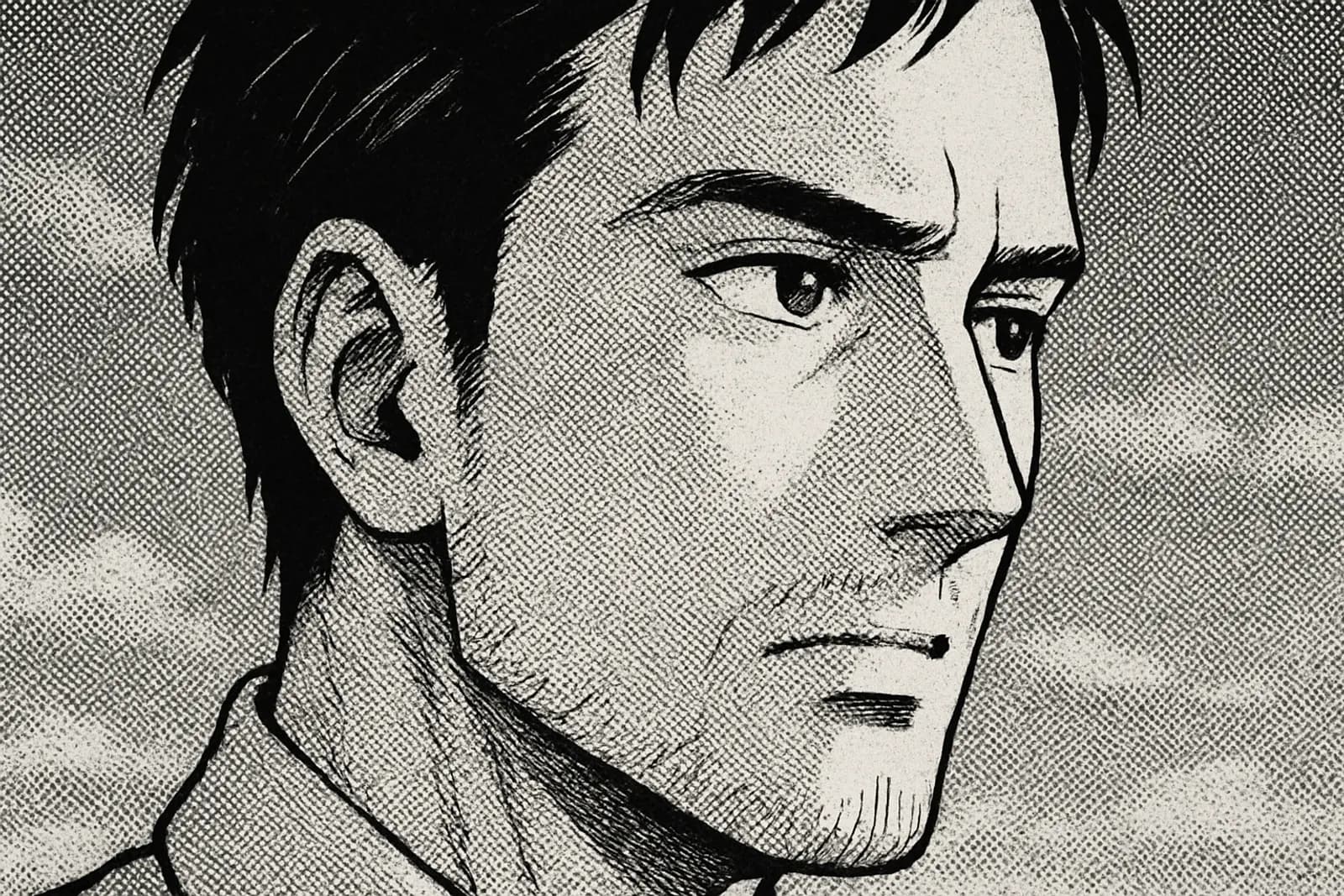
Screentones are the dotted shading patterns that give B&W manga its look. Here's what they are, how they're made, and how AI tools simulate them.
Written by Bugra, founder of Gootaku
Quick answer
A screentone is a pattern of dots, lines or textures laid over black-and-white manga art to create shades of grey, shadow and texture. It once came as adhesive printed sheets and is now mostly applied digitally, and AI manga tools can be prompted to imitate it.
Contents
A screentone is a pattern of dots, lines or textures that manga artists lay over black-and-white art to create shades of grey, shadow and texture. Originally it came as adhesive printed sheets that were cut and stuck onto the page; today most artists apply the same patterns digitally.
The classic look, that uniform dot pattern on a character's shadow or a darker area, is screentone. Modern manga is mostly made digitally, but the look persists, and AI manga tools (like Gootaku) can be prompted to imitate it.
Key facts
- Japanese name: トーン (tōn), from "screentone"; dot tones are sometimes called "N-tone" or ami-tone.
- Why it exists: black-and-white printing can't reproduce smooth grey wash well, so grey is faked with patterns of pure black.
- Physical sheets: brands such as Deleter and IC (Japan) and Letraset (West) sold adhesive tone sheets cut with a knife.
- Digital today: apps like Clip Studio Paint apply tone as a layer setting, so density and pattern can be changed after the fact.
- Related but not identical: halftone is the general printing principle; screentone is the manga art technique built on it.
The Origin Story
Before digital tools (pre-1990s), manga artists worked on paper. The challenge: how to add shades of grey between pure black and pure white in a printable format?
Three options:
- Crosshatching — Drawing parallel lines for shadow (time-consuming)
- Painting grey — Doesn't reproduce well in cheap newspaper printing
- Screentones — Sheets of adhesive printed patterns, cut and applied
How Physical Screentones Worked
A traditional screentone is:
- A clear adhesive sheet (like a sticker)
- Pre-printed with a specific dot pattern, line pattern, or texture
- Cut to shape with a knife
- Stuck onto the manga page
- Excess removed with a blade
Manga assistants spent hours per page just cutting and applying screentones. It was tedious skilled work.
Common Screentone Types
The standard catalog (used by Letraset, Deleter, IC):
Dot tones
- Line frequency (LPI, lines per inch) — mid values are the everyday default; coarser tones read as bolder, finer tones as smoother
- Density 10-80% — How dark the shading reads
Line tones
- Parallel lines — Sky, wind, speed effect
- Crossed lines — Heavy shadow, fabric
- Curved lines — Hair, fur, water
Texture / pattern tones
- Brick, stone, wood patterns
- Star, sparkle patterns
- Sound effect motion lines
- Atmospheric clouds, fog
Digital Screentones (How Modern Manga Works)
Since the 2000s, a growing share of manga production has moved to digital. Tools:
- Clip Studio Paint (now industry standard)
- MediBang
- Photoshop with manga brushes
- Infinite variety (no need to physically buy sheets)
- Easy adjustments (resize, recolor, change density)
- No paper waste
- Layer-based undo
Screentones vs Halftones
These get confused:
- Halftone = General term for any technique that simulates grey with patterns of dots/lines
- Screentone = Specifically, the sheet-based technique used in manga
| Technique | How grey is made | Where you see it | Look | |---|---|---|---| | Screentone | Pre-made dot/line/texture pattern laid over ink | B&W manga | Even, mechanical, graphic | | Halftone | Printing process that breaks images into dots | Newspapers, Western color comics | Visible dot grid up close | | Crosshatching | Hand-drawn crossing lines | Seinen, Western ink comics | Gritty, textured, labor-heavy | | Grey wash / gradient | Diluted ink or digital gradient | Color comics, webtoons, illustration | Smooth, painterly |
But "screentone" in manga context is specific. It implies a designed pattern, applied intentionally, in distinctive manga style.
Why Manga Looks "Manga" — The Role of Screentones
If you removed screentones from a manga page, it would look like a Western inked comic. The screentone IS what makes manga visually distinct.
The classic manga look:
- Pure black ink for outlines
- Pure white paper for highlights
- Screentones for everything in between
Iconic Screentone Uses
Watch for these in any manga:
Mood screentones
A panel where everything is covered in a dense halftone = oppressive, dark, ominous.Speed lines
Radial dot patterns or line patterns indicate motion. Used in shonen action constantly.Character emotional state
A character covered in screentone density that grows darker frame-by-frame = becoming more desperate / angry / haunted.Background atmosphere
Foggy/dusty/snowy environments are often pure white background + a light atmospheric screentone overlay.Fabric and texture
Different screentones for different clothing materials — denim, silk, leather all get distinct patterns.Screentones in AI-Generated Manga
When AI generates "manga style" output, it often defaults to smooth grey gradients rather than authentic screentones. This is one of the tells of AI manga.
The fix is explicit prompting. In Gootaku Studio, the Classic B&W manga style asks the model for clean ink linework with screentone patterns only (dot tone for skin, line tone for shadows) and no smooth digital gradients. The Shojo style asks for soft, floral screen tones. The Shonen style deliberately leans on bold hatching and speed lines for action instead, and Seinen on heavy crosshatching.
Without prompt explicitness, AI tends toward "anime art" smoothness rather than "manga" texture.
For more on the visual style: Shonen Manga Style Guide, Seinen Manga Style Guide.
When NOT to Use Screentones
Modern manga sometimes omits screentones deliberately:
- Webtoons / manhwa — Color replaces screentone; no need for halftone shading
- Color manga pages (special chapter pages, covers) — Color = no halftone
- Cinematic single panels — Sometimes left ungrey for impact
Screentone Examples by Genre
Shonen
Heavy screentone for action — speed lines, impact bursts, dramatic backgrounds. Bold use.Shojo
Soft delicate screentones — flower patterns, sparkle textures, gentle gradients. Romantic atmosphere.Seinen
Most screentone-intensive — crosshatching emulation, dense atmospheric shading, realistic textures. Berserk is the screentone pinnacle.Chibi / comedy
Minimal screentone — chibi works with flat color blocks for energy.Iconic Screentone Manga
To see screentone mastery in print:
- Berserk (Kentaro Miura) — The textbook for atmospheric screentone use
- Vagabond (Takehiko Inoue) — Brush + screentone integration
- Akira (Katsuhiro Otomo) — Cyberpunk textures and architectural detail
- Junji Ito's horror works — Screentones for skin texture and dread atmosphere
- Naruto — Dynamic action screentone use
How to Add Screentones to AI Manga
If you're creating AI manga and want authentic screentones:
Method 1: Prompt explicitly
... shonen manga style, ink-heavy linework, traditional halftone screentone shading,
60-LPI dot patterns, high contrast B&W, no smooth gradients
Method 2: Post-process
Generate clean linework via AI, then add screentones in:- Clip Studio Paint (best)
- Photoshop with manga brushes
- Free alternatives: Krita, MediBang
Method 3: Use Gootaku's manga preset
Gootaku's Manga Maker ships with screentone-aware prompts in its Manga style options. Pick "Classic B&W" (or "Shojo" for softer tones) and the output usually includes screentone-style patterns. Results are AI-generated, so a panel can still come out with some smooth grey; regenerating or adding "dot-tone shading, no gradients" to your scene helps.Try It
In Gootaku Studio, generate a panel with the Classic B&W manga style, then the same scene in Comic mode's Anime style. You'll see the screentone difference — same character, dramatically different feel.
Generate authentic manga → — 1 free token to start and 1 more every 2 days.
If you'd rather skip the prompt-tuning above, the Gootaku Manga Maker's Classic B&W and Shojo styles already ask for dot-pattern shading, so a scene description alone can come out with screentone-style texture.
Try the AI Manga Maker → — 1 free token to start and 1 more every 2 days, no card required.
---
More ways to bring this to life
Frequently Asked Questions
What is screentone in manga?
Screentone is a dot-pattern shading technique used in black-and-white manga to suggest color, shadow, texture, and mood without actual color ink — different dot densities and patterns read as different shades of gray at a glance.
Why do manga artists use screentone instead of just shading with a pencil?
Screentone gives a clean, consistent, mechanically reproducible tone that prints well and matches manga's traditional black-and-white production process — it's faster and more uniform across pages than hand-shaded gradients.
Do webtoons and full-color manga use screentone?
Rarely, since they're already in color and don't need a monochrome shading technique — color, gradients, and lighting effects do the job screentone does in black-and-white manga.
Can AI tools replicate authentic screentone shading?
Yes, with the right style preset — Gootaku's manga-focused styles (like Classic B&W or Shojo) are tuned to produce screentone-style shading, which looks noticeably different from a generic "anime style" prompt.
Related Definitions
- What is Shonen? — Heavy screentone genre
- What is a Webtoon? — Mostly screentone-free (uses color)
- What is Manga vs Anime? — Screentone is a manga thing
Deeper Guides
- Shonen Manga Style Guide — Dramatic screentone use
- Seinen Manga Style Guide — Most screentone-intensive genre
- Webtoon / Manhwa Style Guide — Why webtoons skipped screentones
- How to Create AI Manga — Full creation workflow
Ready to create your own manga?
Start free — no credit card required. 1 free AI generation on signup, +1 every 2 days.
Start CreatingOn the go? Get the Gootaku iPhone app.
Related guides
Manga Terms Glossary — Essential Definitions
Complete reference for manga terminology — from screentone to webtoon, chapter structure to visual t…
What Is Seinen? Meaning, Themes & Examples
Seinen (青年) means “young man”: manga for adult readers, darker and more complex than shonen. What se…
What Is Shojo? Bigger Than "Romance for Girls
Shojo (少女) means “young girl”: manga for teen girls, focused on emotion and relationships, not only …
What Is Shonen? Definition, Examples & Origins
Shonen (少年) means “young boy”: manga for teen boys, built on action, rivalry and growth. The shonen …
Horror Manga Style — Complete Guide for AI Creators
Master the horror manga style for AI art — heavy cross-hatching, unsettling detail, dread-filled neg…
Isekai Manga Style Guide — Worlds, Tropes & AI Prompts
Isekai is manga's most popular genre right now. Master the visual codes — fantasy worlds, status win…