Manga Speech Bubble Design Guide — Types, Rules, and Style
Master speech bubble design — shapes, tail placement, text size, and fonts. Includes rules for every bubble type with AI-friendly templates.
Written by Bugra, founder of Gootaku
Quick answer
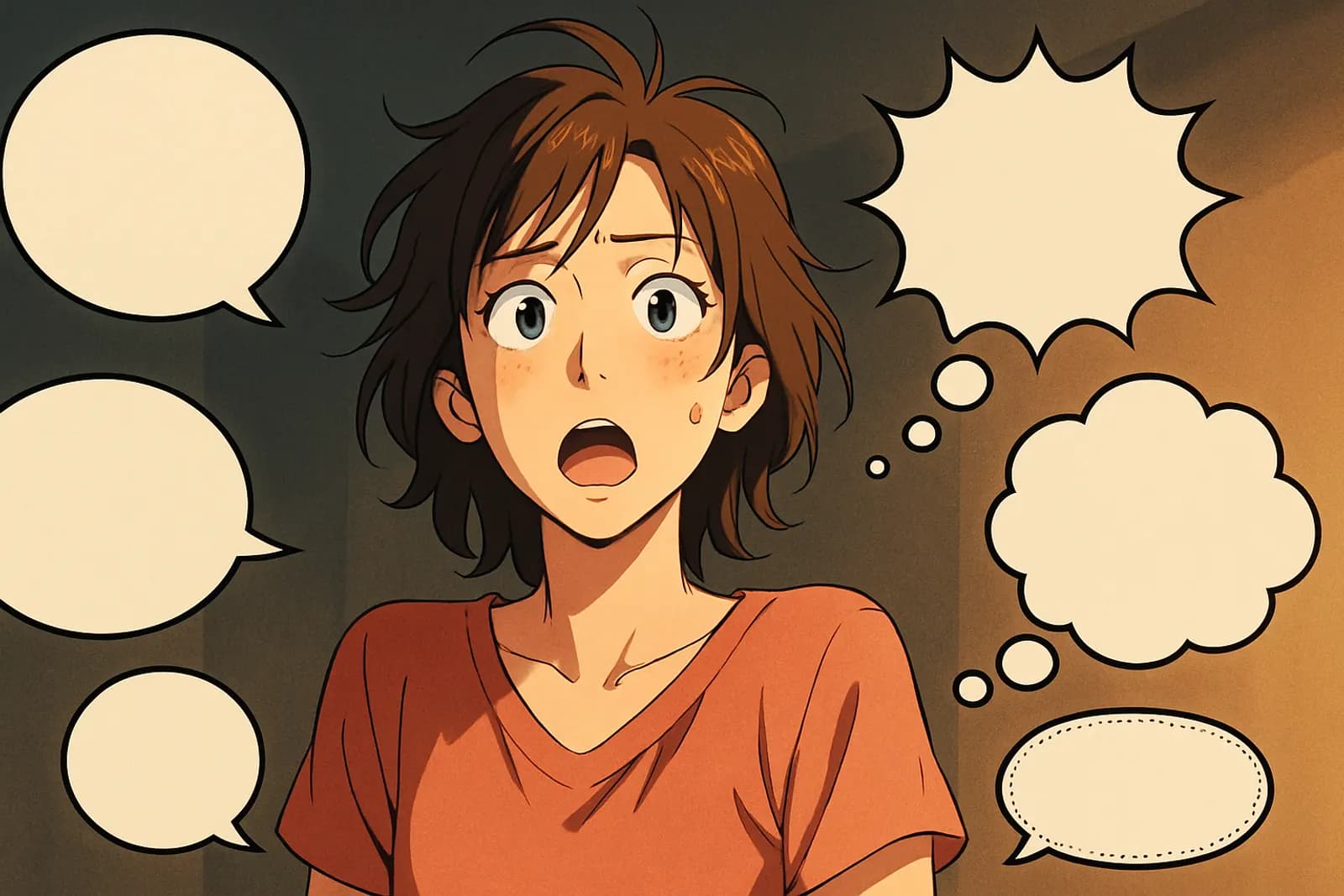
Good manga speech bubble design matches shape to delivery: oval for speech, cloud for thought, spiky for shouting, dashed for whispers and boxes for narration. Point the tail toward the speaker and place bubbles in reading order without covering key art.
Contents
Good manga speech bubble design means matching the bubble shape to how a line is delivered (oval for speech, cloud for thought, spiky for shouting, dashed for whispers, boxes for narration), pointing the tail toward the speaker, and placing bubbles in reading order (right-to-left in Japanese manga) without covering key art. A speech bubble is more than a container for dialogue. In manga, bubbles communicate tone, volume, mood, and even who's speaking when there's no name attached. Get bubbles right and your dialogue feels alive. Get them wrong and a great scene reads as amateur.
This guide covers every bubble type used in modern manga, with style rules and placement principles.
The 9 Essential Bubble Types
1. Standard Speech Bubble
Shape: Smooth oval or rounded rectangle Tail: Pointed, leading to speaker's mouth Text: Normal weight, comfortable size Use: Default for spoken dialogue
╭─────────────╮
   │ I think we   │
   │ should leave.│
   ╰────╲────────╯
        ╲
       [character's mouth]
The workhorse. 80% of bubbles in a typical chapter are standard.
2. Thought Bubble
Shape: Cloud-like, scalloped edges Tail: Trail of small bubbles (not a pointer) Text: Often italic to distinguish from speech Use: Internal monologue, unspoken thought
╭✧⌒╮✧⌒╮
   │ He doesn't  │
   │ know yet... │
   ╰─────────────╯
     ◯
       ○
         ∘  [character's head]
Critical for showing what characters think but don't say. Underused by beginners.
3. Shout / Yell Bubble
Shape: Jagged, starburst, spiky edges Tail: Sharp arrow, sometimes broken Text: BOLD, often LARGER, may break outside the bubble Use: Yelling, screaming, urgent commands
⟆━━━━━━━━━⟇
   │  WATCH    │
   │   OUT!!   │
   ⟈━━╲━━━━━━━⟉
       ╲
      [mouth]
Visual rule: the more violent the emotion, the spikier the edges and bigger the text.
4. Whisper Bubble
Shape: Dashed outline, smaller than normal Tail: Thin dashed pointer Text: Smaller, sometimes parenthetical Use: Whispers, secrets, quiet asides
╭┄┄┄┄┄┄┄┄┄┄╮
   ┊ (don't tell  ┊
   ┊  the others) ┊
   ╰┄┄╲┄┄┄┄┄┄┄┄┄╯
Most amateur manga skips this distinction — and loses subtle scenes.
5. Narrator Box
Shape: Hard-edged rectangle (no tail) Position: Usually top or bottom of panel Text: Often serif or distinct from speech font Use: Omniscient narration, time skips, scene-setting
┌───────────────────────────────┐
│ Three weeks later, in Tokyo... │
└───────────────────────────────┘
A power tool. Use 1-3 per chapter for maximum impact.
6. Connected / Linked Bubbles
Shape: Two or more bubbles joined together with a connector Tail: Single tail to speaker Use: Single speaker, multiple pauses or sentences
╭───────────────╮
   │ I thought about it... │
   ╰──╮────╭───────╯
      ╰────╯
   ╭───────────────╮
   │ And I'm leaving.│
   ╰──╲────────────╯
Forces the reader to slow down. Each bubble = one breath.
7. Off-Panel Bubble
Shape: Standard, but tail points off the panel edge Use: Someone speaks from outside the frame
╭─────────────╮
                    │ Yuki, get   │
                    │ down here!  │
                    ╰─────────────╯
                          ╲ → off-panel
   ┌─────────────────────────────┐
   │ [Yuki looking up, in panel]  │
   └─────────────────────────────┘
Creates anticipation and lets you control pacing — character on-page reacts to invisible speaker.
8. AI / Robot / Demonic Bubble
Shape: Sharp angular polygons, sometimes hexagonal Edge: Often double-lined Text: Specific font (square / monospace) for non-human voice Use: Robots, AI, demons, supernatural
╔═════════════════╗
   ║ TARGET ACQUIRED ║
   ║ ENGAGING NOW... ║
   ╚═══╗════════════╝
       ╗
      [robot/demon]
Visually signals "this isn't human."
9. Distorted / Garbled Bubble
Shape: Wavy, melting, broken Use: Disorientation, dizziness, drugged, dying, magical effects
∿∿∿∿∿∿∿∿∿∿
   ∿ what... ∿
   ∿ happening ∿
   ∿∿∿∿∿∿∿∿∿∿
Powerful in horror, sci-fi, psychological scenes.
Bubble types at a glance
| Type | Shape | Tail | Use | |---|---|---|---| | Standard speech | Smooth oval / rounded rectangle | Pointed, toward mouth | Normal dialogue | | Thought | Cloud, scalloped edges | Trail of small circles | Internal monologue | | Shout | Jagged starburst | Sharp, often short | Yelling, shock | | Whisper | Dashed or thin outline | Thin or dashed | Quiet, secret lines | | Narrator box | Rectangle at panel edge | None | Narration, time/place | | Connected | Linked bubbles | One tail on first bubble | Pauses within one speaker's turn | | Off-panel | Standard shape at panel edge | Points out of frame | Speaker not visible | | AI / robot / demonic | Angular or inverted colors | Varies | Non-human voices | | Distorted / garbled | Wobbly, broken outline | Wobbly | Radio, fear, damage |
Bubble Placement Rules
Where you put the bubble matters as much as the bubble itself:
Reading order priority
Place bubbles so they read in correct flow order:- Japanese manga: Top-right first, bottom-left last (panel-internal)
- Western: Top-left first, bottom-right last
Tail toward mouth, not at it
The tail should point generally toward the speaker's mouth, but not stab into it. Leave breathing room.❌ Tail piercing character face ✅ Tail pointing toward mouth from comfortable distance
Don't cover important art
Don't place bubbles over:- Character faces (especially eyes)
- The focal point of the composition
- Key visual storytelling elements
- Empty sky / background
- Less detailed corners
- Non-essential body areas (shoulders, sides)
Bubble pyramid (multiple speakers)
For conversations, arrange bubbles in a top-down "pyramid" matching dialogue order:╭──── A ────╮
│ │
╰─────────────╯
╭──── B ────╮
│ │
╰─────────────╯
╭──── A ────╮
│ │
╰─────────────╯This is the natural reading pattern — eye drops down naturally as it reads.
Text Inside the Bubble
Sizing rules
| Volume | Text size | |--------|-----------| | Whisper | Small, often parenthetical | | Normal speech | Standard size | | Emphasis | One word bolded | | Yell | Larger, bolder | | Scream | LARGEST + bold + multiple exclamations |
Line breaks
Manga bubbles use frequent line breaks. Aim for:
- 3-7 words per line
- 1-4 lines per bubble
- Center-aligned text inside the bubble
Punctuation
Manga uses punctuation expressively:
...(ellipsis) — Trailing off, pause, hesitation…!— Cut-off realization?!— Surprised confusion!!— Maximum emphasis——(em-dash) — Interrupted speech
?— Standard question!— Standard exclamation.— Often omitted entirely at end of sentences in manga
"...are you okay?"          ← uncertain
"Are you okay!?"            ← worried + slight shock
"ARE YOU OKAY?!?!"          ← panic
"Are you—!"                 ← cut off mid-question
Bubble Order Mistakes
Common mistakes that break reading flow:
❌ Bubbles in wrong order
Reader has to scan around to figure out who spoke first. Read your draft from a stranger's perspective — does the conversation make sense in the order they read the bubbles?❌ Too many bubbles in one panel
4+ bubbles in a single panel = visual chaos. Split across multiple panels.❌ Bubble too big
Bubble taking 50%+ of the panel kills the art you generated. Trim dialogue or split across panels.❌ Tails to the wrong speaker
A tail must clearly point to ONE speaker. Ambiguous tail placement = ambiguous attribution.❌ Standard bubble for everything
Using only one bubble type for whispers, yells, and thoughts flattens the dialogue's emotional range.Style Guides for Different Genres
Shonen
- Sharp angular bubbles for action moments
- Frequent shout bubbles with bold text
- Thought bubbles less used (more external dialogue)
- Narrator boxes for time skips and arc transitions
Shojo
- Soft rounded bubbles
- More thought bubbles (internal monologue heavy)
- Narrator boxes for romantic introspection
- Sparkly accents inside bubbles for "moe" moments
Seinen
- Cleaner, simpler bubbles
- Fewer bubbles overall (more silent panels)
- Distinct narrator box style (clean serif text)
- Whisper bubbles common in conspiratorial scenes
Chibi / Comedy
- Cartoonish bubble shapes
- Oversized text for jokes
- "Wavy" bubbles for crying / dramatic exaggeration
- Multiple connected bubbles for rapid-fire jokes
Manhwa / Webtoon
- Often cleaner, more digital-looking bubbles
- More color in bubbles sometimes (yellow for narration, etc.)
- Vertical-friendly placement (more thought to scroll flow)
- Modern fonts more common than serif
Bubble Tools in Gootaku
Gootaku letters panels in the editor, on top of the art — the AI does not draw bubbles or dialogue (image prompts ask for no text). Each panel can carry dialogue in four bubble types (speech, thought, shout, silent), plus a narration box and an SFX field. Workflow:
- Generate panel art (image only, no text; 1 token per panel)
- Pick the bubble type and type the dialogue
- Add narration or SFX if the beat needs it
- In the Studio beta editor, drag balloons where you want them (up to 6 per panel); the classic editor places dialogue at the bottom, narration top-left and SFX top-right
- Export as a PNG strip or CBZ, or publish to Explore — the lettering is drawn the same way in each
Bubble Workflow for a Page
For a typical manga page:
- Plan dialogue beats in your panel script
- Mark bubble type per beat (standard, thought, shout, whisper, etc.)
- Generate panel art with dialogue space considered (don't fill every corner with art)
- Drop bubbles into panels in reading order
- Place tails toward speakers
- Trim dialogue if any bubble takes 40%+ of panel
- Add narrator boxes at panel borders if needed
Font Selection
Most modern manga uses 2-3 fonts:
- Standard speech — Clean sans-serif (Wild Words, CC Wild Words, custom)
- Narration boxes — Slight serif or different weight
- AI/demon/robot — Monospace or angular
Practice Exercise
Take any conversation between two characters. Write it three ways:
- All standard bubbles — How does it read?
- One thought bubble, one shout, rest standard — How does it feel different?
- Half the dialogue replaced with narrator boxes — Does it feel more distant?
Try the bubble editor in Gootaku → — 1 free token to start and 1 more every 2 days.
---
More ways to bring this to life
Frequently Asked Questions
What are the different types of manga speech bubbles?
The main types are: rounded bubbles for normal speech, jagged/spiky bubbles for shouting or intense emotion, cloud-shaped (fluffy-edged) bubbles for internal thoughts, and borderless caption boxes for narration. Some artists also use dashed-outline bubbles for quiet or trailing-off speech.
How do you know which character is talking in a bubble?
The bubble's tail (the small triangular point) always points toward the speaker. When two characters are close together, the tail placement and its angle are what tell the reader who's saying what, even without a name label.
Should speech bubbles overlap panel borders?
It's a stylistic choice used for emphasis — a bubble that breaks the panel border can signal a sudden interruption or a very loud line. Used sparingly, it's effective; used constantly, it reads as cluttered and undermines the emphasis.
Can AI tools place speech bubbles automatically?
Not reliably as finished lettering — image models tend to draw garbled text inside bubbles. In Gootaku the AI generates the panel art without text, and you add dialogue as editable bubbles (speech, thought, shout or silent) plus narration and SFX in the editor, so the words stay readable and you choose the bubble type yourself.
Keep Reading
- Try the AI Manga Maker → — generate manga panels from text, free to start
- How to Write Manga Dialogue — The words inside the bubbles
- Japanese Manga Sound Effects Guide — SFX work alongside bubbles
- Manga Panel Composition Rules — Where bubbles fit in your panel layout
- How to Create AI Manga in 2026 — Full workflow including bubble placement
- How to Plot a Manga Chapter — Dialogue serves the plot
Ready to create your own manga?
Start free — no credit card required. 1 free AI generation on signup, +1 every 2 days.
Start CreatingOn the go? Get the Gootaku iPhone app.
Related guides
Mangaka Meaning: What a Mangaka Is and How They Work
Mangaka means a manga artist, the person who writes and usually draws a manga. What the word means, …
Action Manga Choreography — How to Stage Fights
Action manga lives on choreography. Learn to stage fight scenes panel-by-panel — camera angles, moti…
AI Storyboard Generator for Manga and Anime Scenes
Learn how to storyboard manga, anime videos, comic strips, and GIF ideas with AI. Includes shot plan…
Common AI Manga Panel Mistakes (And How to Avoid Them)
The recurring mistakes that make AI manga panels look generic, cluttered, or off-model — and the spe…
How to Design a Manga OC From Scratch (No Drawing Required)
A step-by-step process for designing an original manga character (OC) from a blank idea to a locked,…
How to Design a Manga Protagonist — Character Guide
Design a memorable manga protagonist — clear visual identity, compelling backstory, and AI-ready cha…